Fast & cheap simulator for a robotic warehouse: the same code in prod and the simulator
We run production warehouse control software and a simulator from a single codebase. Good old event-driven simulation keeps runs cheap and fast, and robot models simple.
The robotic warehouse
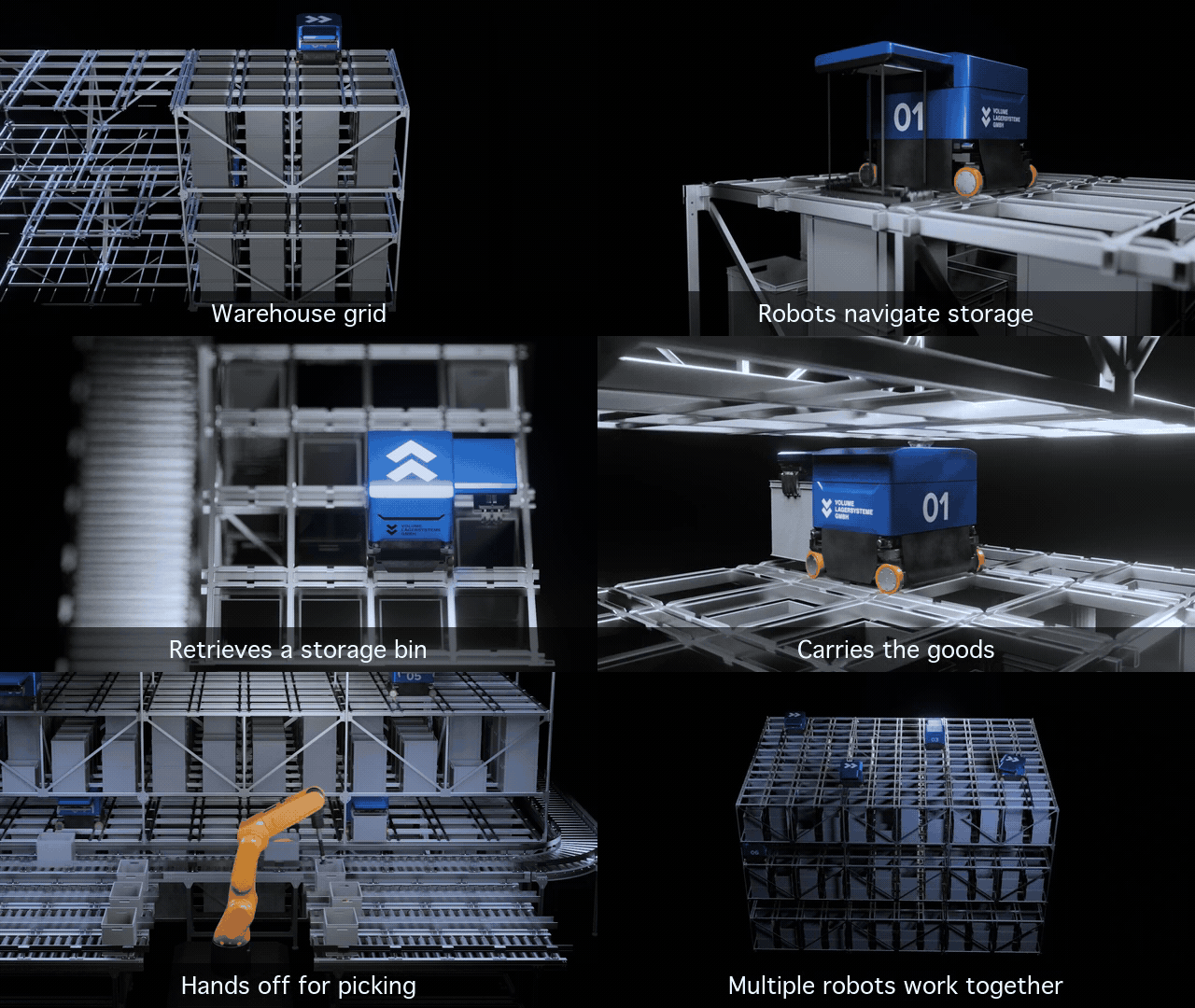
At Volume DIVE, we build warehouses where wheeled robots move plastic containers along a shared rail grid, carrying them between storage stacks and stations where people pick or replenish goods.
Three months wasted
… trying to use pre-built warehouse simulation software. The problems I recall:
- Popular simulators used in robotics, such as Gazebo and NVIDIA Isaac Sim, are glorified physics engines. I need to compute throughput, analyze robot routes, and simulate delays, rather than calculate the friction that keeps a plastic container in place.
- Warehouse and logistics simulators, such as AnyLogic and Visual Components, are literally visual and have closed ecosystems. You need to assemble both the grid and the robots in a 3D editor. That’s a lot of manual work.
- Built-in UIs are only good for sim. And I want to have the same visualization for the simulator and production.
- Most of the simulators are expensive. Ready to spend $10k+?
Grappling with “easy-to-use” simulators helped me figure out what we need.
Requirements
- The same code in production and simulation.
- Faster-than-real-time simulation.
- A web server and browser-based UI.
- Primitive physics, complicated behaviour where we want it.
Implementing from scratch: architecture & ideas
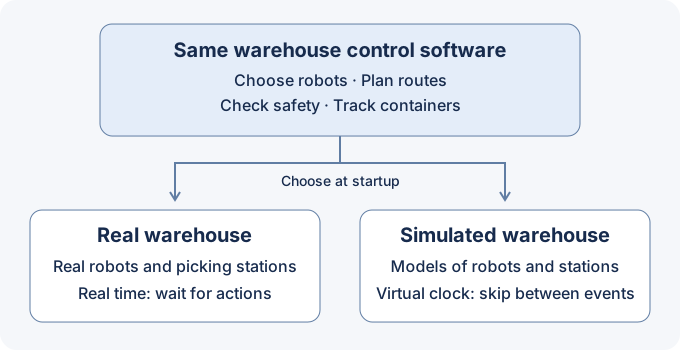
Basically, the design flows from the requirements. Single code base controls robots and records container locations. For simulation we change only two things:
- Real-time clock -> virtual clock
- Real robots -> simulated robots
Virtual clock
The simulator keeps a queue of events, each with a virtual time: a robot starts moving, arrives, or finishes lifting. It processes all events at the current time, updating the warehouse and scheduling what happens next, then jumps to the earliest pending event.
Try the simulation below of two robots driving simultaneously on the grid: click Process until no events are ready, then Advance time.
- Robot AReady0 sA starts moving
- Robot BReady0 sB starts moving
- Robot AReady4 sA arrives
- Robot AScheduled4 sA starts lifting
- Robot AScheduled7 sA finishes lifting
- Robot BScheduled10 sB arrives
Start the simulation to emit the first events.
The robots move concurrently in the model, though the computer processes events one by one. B’s journey takes ten virtual seconds without ten seconds of real waiting. Simple, fast, and cheap.
Open-source libraries supporting discrete-event simulation are readily available: SimPy (Python), OMNeT++ (C++), and JSL (Java). Or you can build a custom event queue.
Conclusions
It’s better to use a ready-made solution, but none fit our project. Implementing one from scratch turned out not to be that hard.
P.S. It’s not new
The “virtual clock” approach here is called discrete-event simulation. Early descriptions include Tocher and Owen’s The Automatic Programming of Simulations (1960), Gordon’s A General Purpose Systems Simulation Program (1961), and Markowitz, Hausner, and Karr’s SIMSCRIPT: A Simulation Programming Language (1962).
References
- Volume DIVE
- Visual Components
- AnyLogic: Warehouse Operations
- Gazebo: Physics
- NVIDIA Isaac Sim: Simulation Fundamentals
- K. D. Tocher and D. G. Owen: The Automatic Programming of Simulations (1960; republished 2008)
- Geoffrey Gordon: A General Purpose Systems Simulation Program (1961)
- Harry M. Markowitz, Bernard Hausner, and H. W. Karr: SIMSCRIPT: A Simulation Programming Language (1962)
- SimPy documentation
- OMNeT++ documentation
- JSL